
A community developer has released WLED More-Info, a custom integration that changes what you see when you open a WLED light in Home Assistant. Instead of the stock light dialog, you get the familiar header, brightness slider, color wheel and color temperature, plus the WLED controls the built-in integration does not show. It follows the same developer’s earlier More-Info Popup Card, whose WLED card has now been split out into this standalone project.
One disclosure up front: the author says the project was vibe-coded with an AI assistant, reviewed step by step and tested on Home Assistant 2026.10 with a real WLED device (MoonModules 14.7, four segments). We installed version 0.4.0 on our test Home Assistant against a simulated WLED controller for the screenshots below, not a real strip, so treat the rest as a summary of what the project says it does.
What it adds
- Secondary color (and a tertiary one when the effect uses it) as a button in the light’s button bar.
- Palettes with previews, like WLED’s own interface. The palettes marked with an asterisk are drawn from the segment’s colors.
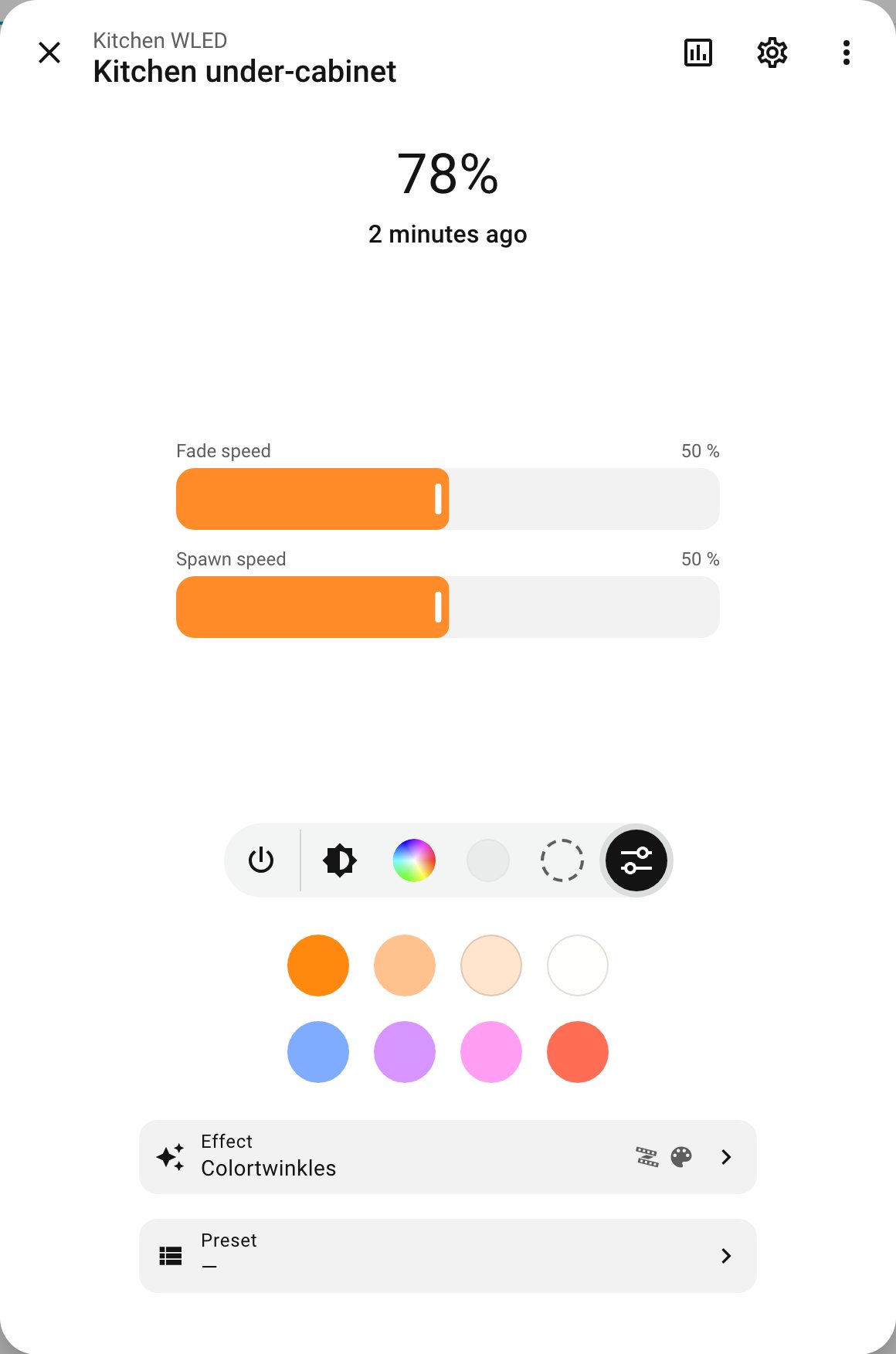
- Effect settings: speed, intensity and the effect’s own sliders, named as WLED names them, showing only the ones that effect uses.
- A searchable effect list grouped by strip, matrix, strip on matrix, audio reactive and uses-palette, plus presets in a similar list.
- Light groups made only of WLED segments, even from different devices, get the same controls and push changes to every member.
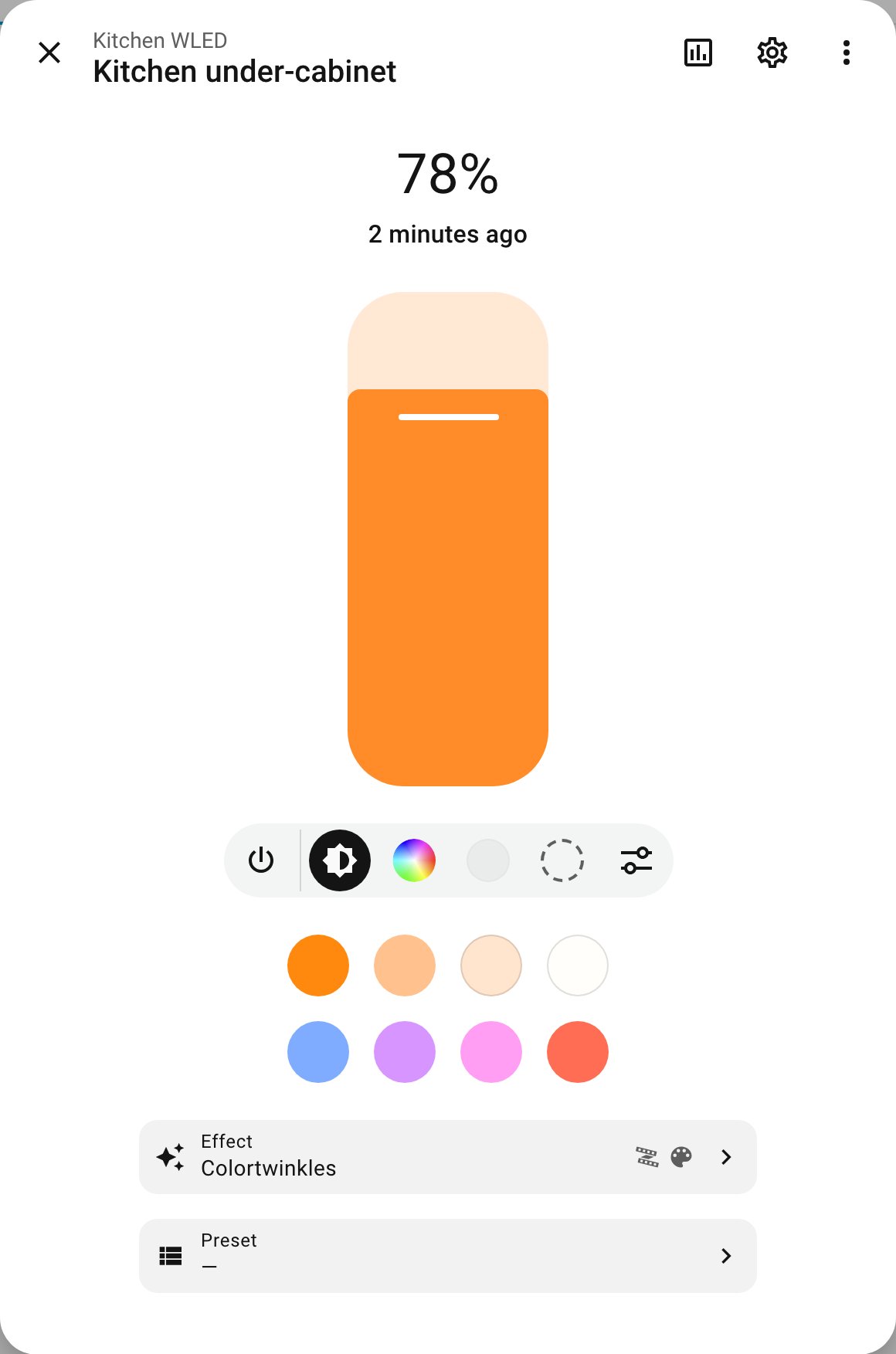
Everything else in the dialog stays native: history, settings, the menu and every other entity. The main WLED light, which only has brightness, keeps the native controls.
Why it is an integration, not just a card
The secondary color, palette previews and effect metadata only exist in WLED’s JSON API. A card running in your browser cannot reach an http:// device from a page opened over https, such as through Nabu Casa, a reverse proxy, or the phone app away from home. This integration has Home Assistant talk to the device through the WLED integration’s own connection, so the project says it works in all those cases. Effect and palette data is cached per device and firmware.
What to check before installing
- Version: it requires Home Assistant 2026.10 or newer and the existing WLED integration. If you are still on an older release, wait.
- It is a custom integration. Install is through HACS as a custom repository (type Integration), then a restart, then Settings, Devices & services, Add integration. Reload the browser afterwards; in the app, close and reopen it.
- It takes over every WLED light’s dialog by default. There is an option in the integration’s Configure screen to turn that off and use it only as a card.
- If you used the WLED card from More-Info Popup Card 0.5 or 0.6, update that card to 0.7 or newer. The card type stays the same, so dashboards keep working.
- Back up first, as with any custom code that injects itself into every page. It is a young project with a small commit history, and Home Assistant updates can break frontend add-ons.
Is it for you?
If you run WLED strips for accent lighting, shelves or under-cabinet runs and currently jump out to WLED’s own web page to change palettes or effect speed, this removes that trip and keeps it all inside Home Assistant. If you only set a color and brightness, the stock dialog is enough and there is no reason to add a custom component. For client installs, we would hold off until it has a longer track record, and keep any WLED scenes and presets defined on the device itself so nothing depends on this add-on.
Project page: GitHub. Forum announcement: Home Assistant Community.