
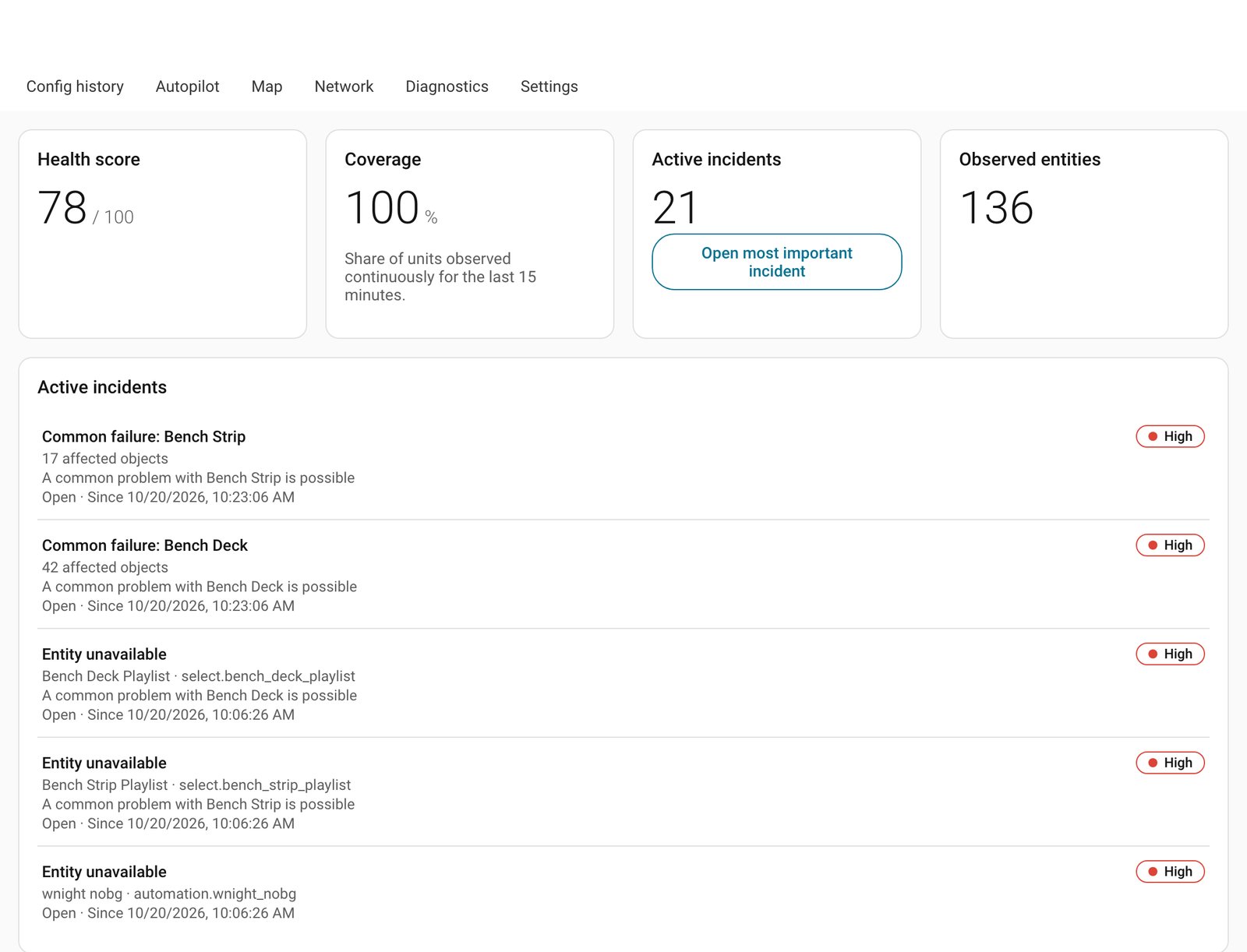
A new custom integration called HA Sentinel was posted to the Home Assistant community forum on October 18, 2026, and its author is asking for testers. The pitch is four questions every installer eventually asks at a client’s house: what stopped working, since when, what does it depend on, and what can be done about it safely. We installed version 0.2.1 on our test Home Assistant and made two simulated WLED controllers fail while it watched (details with the screenshots); the rest comes from the author’s forum post and the project’s GitHub page. In our test it grouped each device’s failure into one incident, as promised, but on startup it also listed about 19 things that were already unavailable as separate incidents, the rough edge the author describes below.
What it does
The author says it runs entirely locally: no cloud, no account, no telemetry, no AI. It keeps its own small SQLite database in the config folder and does not touch the Recorder database or other integrations’ files. It adds an admin-only sidebar panel with several parts:
- Overview: a 0 to 100 health score. It is greyed out as partial during the first 15 minutes or after a monitoring gap, so missing data is never shown as healthy. Important devices can be weighted 1 to 5.
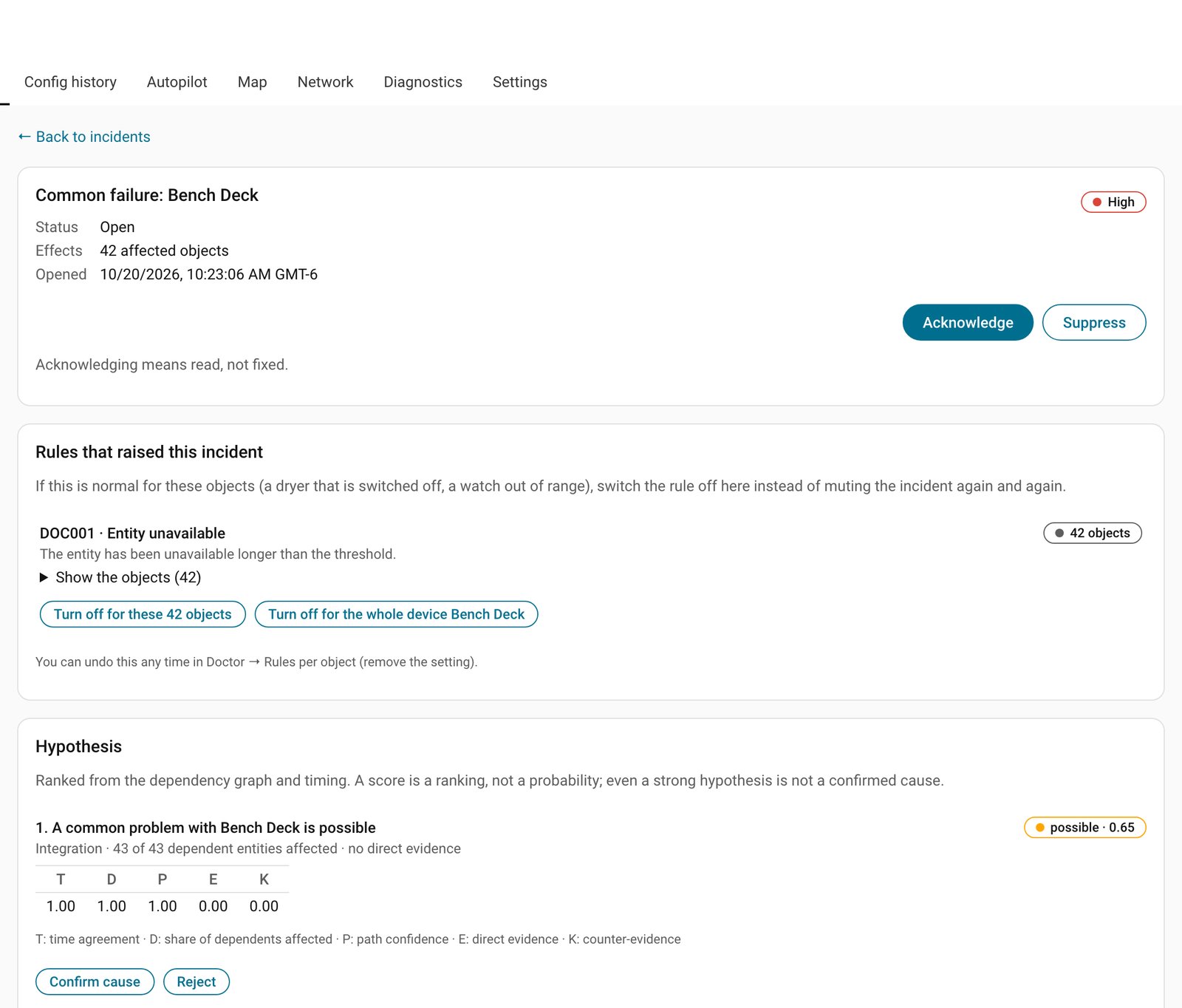
- Doctor: related problems are grouped into one incident, so a dryer with 14 unavailable entities gives one incident, not 14. Each one separates what was observed, a ranked probable cause (the author is clear it is a ranking, not a probability), counter-evidence and a suggested check. Rules cover unavailable, unknown and flapping entities, low battery, missing heartbeat, broken references in imported YAML, missed automation runs, weak signal and available updates. Maintenance windows keep planned work from raising alarms.
- Config history: paste in automations, scripts or blueprints and keep versions with a semantic diff. Secrets are not stored in plain text. An optional restore feature works only on a managed file you include yourself, with preview, approval, rollback on failure, and it never edits files the HA editor owns.
- Autopilot (off by default): static checks of automations for missing entities, loops, conflicts and missing hysteresis, plus a replay against recorded history that never calls an action.
- Map and Network: a dependency map built from registries and imported YAML. By default it only uses what Home Assistant already knows and never scans your LAN. Optional probes of TCP/HTTP endpoints you approve are rate-limited and allowlisted.
What to know before installing
The forum post describes version 0.1.0 as the first public release, and the GitHub page now lists 0.2.1, so the project is moving quickly. It installs through HACS as a custom repository, needs no token, and requires Home Assistant 2026.5.1 or newer. The author says it was tested on 2026.5.1 and 2026.10.2. It is GPL-3.0 licensed, and the panel is in English and Polish.
The author documents one rough edge from 0.1.0: on first start, devices that were already unavailable, such as a switched-off dryer, show up as incidents dated at Sentinel’s start time. That date means “at least since”, not when the problem began. You can turn a rule off per entity under Doctor, Rules per object. Per-device switching and clearer wording are on the to-do list. The GitHub issues page currently shows no open issues, which tells you how new this is.
What it means for an installed system
This is a young project from a single developer, so treat it as a trial, not a dependable monitor. Our suggestions:
- Take a backup first. It is a custom integration, and a restart is needed to load it.
- Try it on a test instance or a quiet system before a client’s house. Watch whether Home Assistant feels slower; the Diagnostics tab shows Sentinel’s own timings.
- Leave Autopilot and managed-file restore off until you have seen how the basic rules behave.
- Expect false alarms from devices that are meant to be off, and tune the rules per entity.
The idea is a good fit for people running mixed Zigbee, Matter, Wi-Fi and cloud devices, where “unavailable” can have many causes. A tool that groups failures and points at a shared dependency could save troubleshooting time. Whether its cause rankings hold up in real homes is exactly what the author wants testers to find out.
If you do test it, the author asks for issues on the project’s GitHub page with your HA version, a rough entity count and, ideally, a redacted diagnostics export. Names and entity IDs are replaced with pseudonyms and IP addresses, MAC addresses and hostnames are left out, but look it over before posting. See the forum thread and the GitHub repository for details.