
Most people shopping for a video doorbell start with the picture quality. That is the wrong place to start. The two things that decide which doorbell will actually work at your door are what is already in the wall and what runs the rest of your house. Get those right and almost any of the doorbells below will do a decent job. Get them wrong and you end up with a doorbell that drains its battery every few weeks, a chime that no longer rings, or a camera Home Assistant can barely see.
As an Amazon Associate, AutoMatter earns from qualifying purchases. It costs you nothing extra.
To be clear up front: this roundup is built from manufacturer spec sheets, the Home Assistant integration docs, owner reports on the Home Assistant forum, and reviews by the YouTube channels credited and embedded below. We have not bench-tested these doorbells side by side. Where a claim comes from one reviewer or one owner, we say so. Prices are US list prices from each maker’s own store in October 2026.
Check these before you shop
- What powers it. Take the old doorbell button off and look. Two thin wires means you have a low-voltage transformer, often 10 or 16 V AC in North American homes. Most wired video doorbells want 16 to 24 V AC, and an undersized transformer is a common reason a new one keeps rebooting. The transformer’s rating is printed on it. A network cable at the door means you can use a PoE doorbell, which is the most reliable option on this list. No wires at all means battery.
- Whether you want to keep the chime. Some doorbells ring your existing mechanical chime. Some do not, and come with a plug-in chime instead. This is the question people forget to ask, and it is listed for every model below.
- Where the video lives. On the doorbell’s SD card, on a recorder or hub in the house, or in the maker’s cloud on a monthly plan. Linus Tech Tips added up the subscriptions over five years and the gap is large: Ring came to about $350 for the basic plan, Nest to almost $700. They also make a fair point in the other direction: “my record of a home invasion … can be destroyed by said home invader with a simple hammer.” Local-only storage is cheaper, but put the recorder somewhere other than the front door.
- What runs your house. Home Assistant, Apple Home, Google or Alexa. This one narrows the list faster than anything else.
- How cold it gets. Several popular doorbells are rated only down to -10 C (14 F). Batteries suffer first. Speak to the Geek, reviewing in the UK, said of his battery Ring doorbells: “in the winter in the very cold weather. They might only last about 4 weeks sometimes.” If you live somewhere with a real winter, wired is worth the extra effort.
Linus Tech Tips’ tier list is a good overview of the mainstream market, including the subscription maths:
For Home Assistant
Reolink Video Doorbell (PoE or Wi-Fi)
This is the doorbell the Home Assistant community recommends most, and it has earned it. It works with Home Assistant’s built-in Reolink integration, which runs locally with no cloud account, and it is one of the doorbell models the integration docs list by name. It also speaks RTSP and ONVIF, so it works with Frigate, Blue Iris and most recorders. Everything Smart Home called it “by far the most complete doorbell I’ve seen in terms of Home assistant Integrations.” That review is from 2023, but the integration has only grown since. For what it is worth, Frenck, one of Home Assistant’s lead developers, put the PoE version on his own new house.
- Power: PoE (802.3af) or 12 to 24 V AC. The Wi-Fi version is wired power only. There is no battery in either.
- Chime: Reolink’s product pages say it does not work with existing mechanical chimes, and it comes with Reolink’s own plug-in chime. Some owners on the Home Assistant forum say newer firmware added a mechanical chime setting, but we could not confirm that, so plan on the plug-in chime.
- Video and storage: 5 MP at 20 fps, microSD up to 256 GB, or a Reolink NVR or Home Hub. No subscription needed.
- The catch: no HomeKit. If your old chime matters to you, this is not the one.
Search Amazon.ca for the Reolink Video Doorbell PoE
Reolink Battery Video Doorbell (2nd Gen)
Reolink’s newer model is the one to look at if you have no network cable at the door. Reolink rates the battery at up to 300 days, based on five minutes of recording a day. Wire it to 16 to 24 V AC and it switches to always-on mode, with 24/7 recording and pre-recording. Unlike the older model, it works with your existing mechanical chime. The picture is square, 2048 x 2048 at 15 fps, so you see the person head to toe and the parcel on the step. Local storage is microSD up to 512 GB, with no subscription. US $149.99.
Home Assistant is where it gets messy, and the sources do not agree:
- Home Assistant’s Reolink docs say battery-powered Reolink cameras need a Reolink Home Hub or NVR. Reolink’s own page says a direct connection is supported with no hub.
- Byte of Geek tested it without a hub: “it absolutely does not need the hub to work with Home Assistant.” His tip is that the camera feed is there, but as two Snapshot entities that are disabled by default. Enable them.
- Simon Says Home Assistant, who was sent the doorbell free by Reolink, got the camera stream into Home Assistant only when it was added through the Home Hub Pro.
- Byte of Geek also found that the visitor entity, the one that tells you someone pressed the button, never changed on his unit, and that two-way audio does not work through Home Assistant. Home Assistant’s docs confirm that two-way audio is not available in the integration.
Our read: buy it with the hub in your budget if a reliable button press in Home Assistant matters to you, or buy the wired PoE model instead. One more note for cold climates. Reolink rates it down to -10 C (14 F), and a Home Assistant forum owner reported the battery sliding from 100% to 78% overnight while hardwired, during a cold snap, with a second owner seeing the same.
Search Amazon.ca for the Reolink Battery Video Doorbell (2nd Gen)
UniFi G4 Doorbell Pro, Doorbell Lite and G6 Entry
If you already run UniFi Protect, a UniFi doorbell is the obvious choice. Home Assistant’s UniFi Protect integration is local, and it gives you a proper ring event, the doorbell’s text display, chime controls, and even fingerprint and NFC events on the G4 Pro. There is no subscription. The catch is that you need a UniFi console running Protect to record to, so it only makes sense if you are in the ecosystem or plan to be. Linus Tech Tips made the G4 Doorbell Pro its flagship pick and put the reason simply: PoE is “much more reliable streaming over a wire.”
- G4 Doorbell Pro (US $299): 16 to 24 V AC (1.25 A max) on the standard version. There is also a PoE kit with its own PoE chime. A second camera looks down at parcels, and it has a fingerprint reader and NFC. It works with a listed set of mechanical and digital chimes, so check yours against Ubiquiti’s list. It is rated only to -10 C (14 F).
- Doorbell Lite (US $99): PoE, 5 MP. Ubiquiti’s pages did not list chime support or a temperature rating, so check before you buy.
- G6 Entry: newer, PoE+, a 5 MP main camera plus an 8 MP package camera, and rated down to -30 C (-22 F). None of the reviewers we used have covered it yet, but on paper it is the UniFi doorbell for a cold climate.
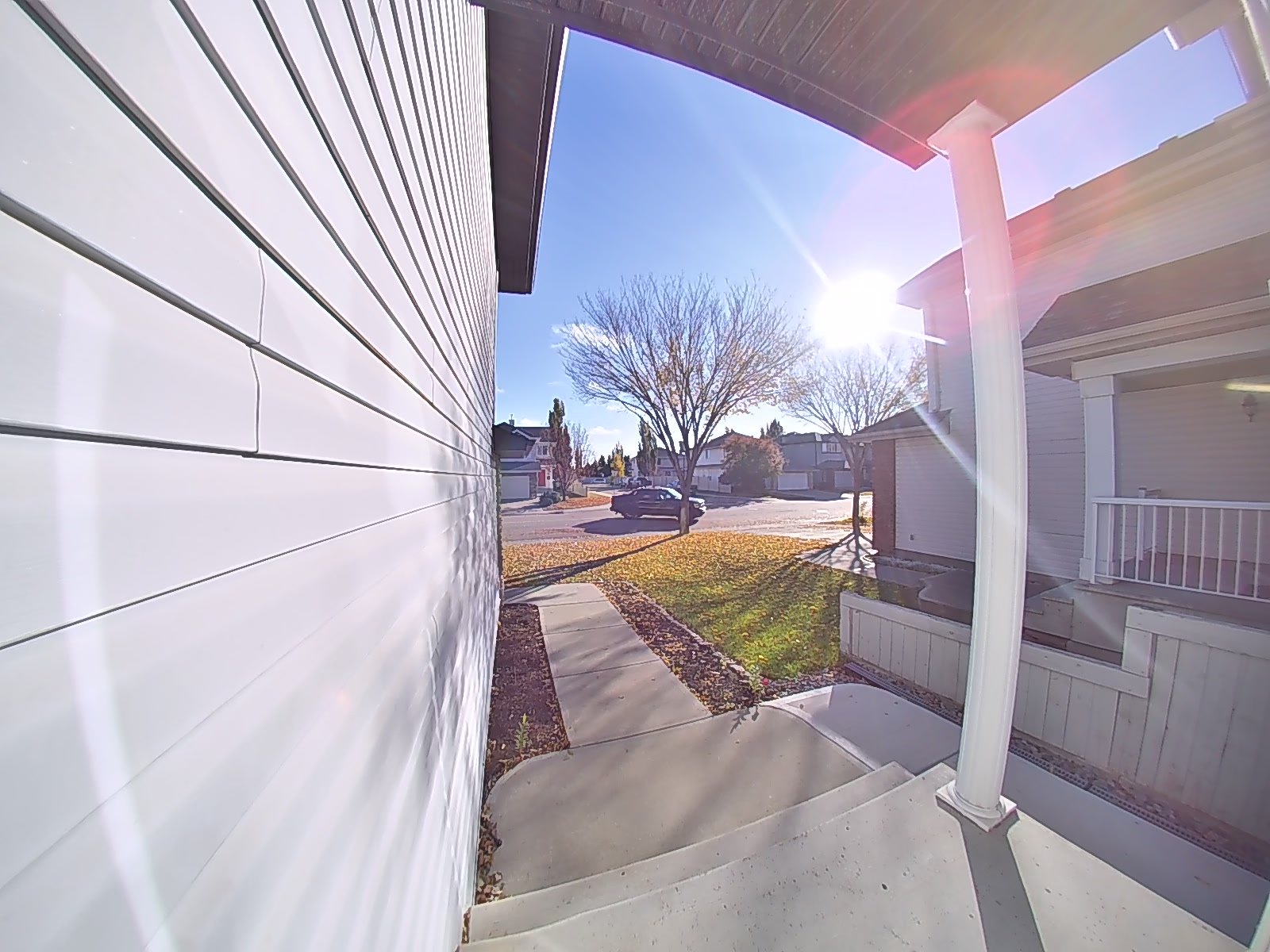
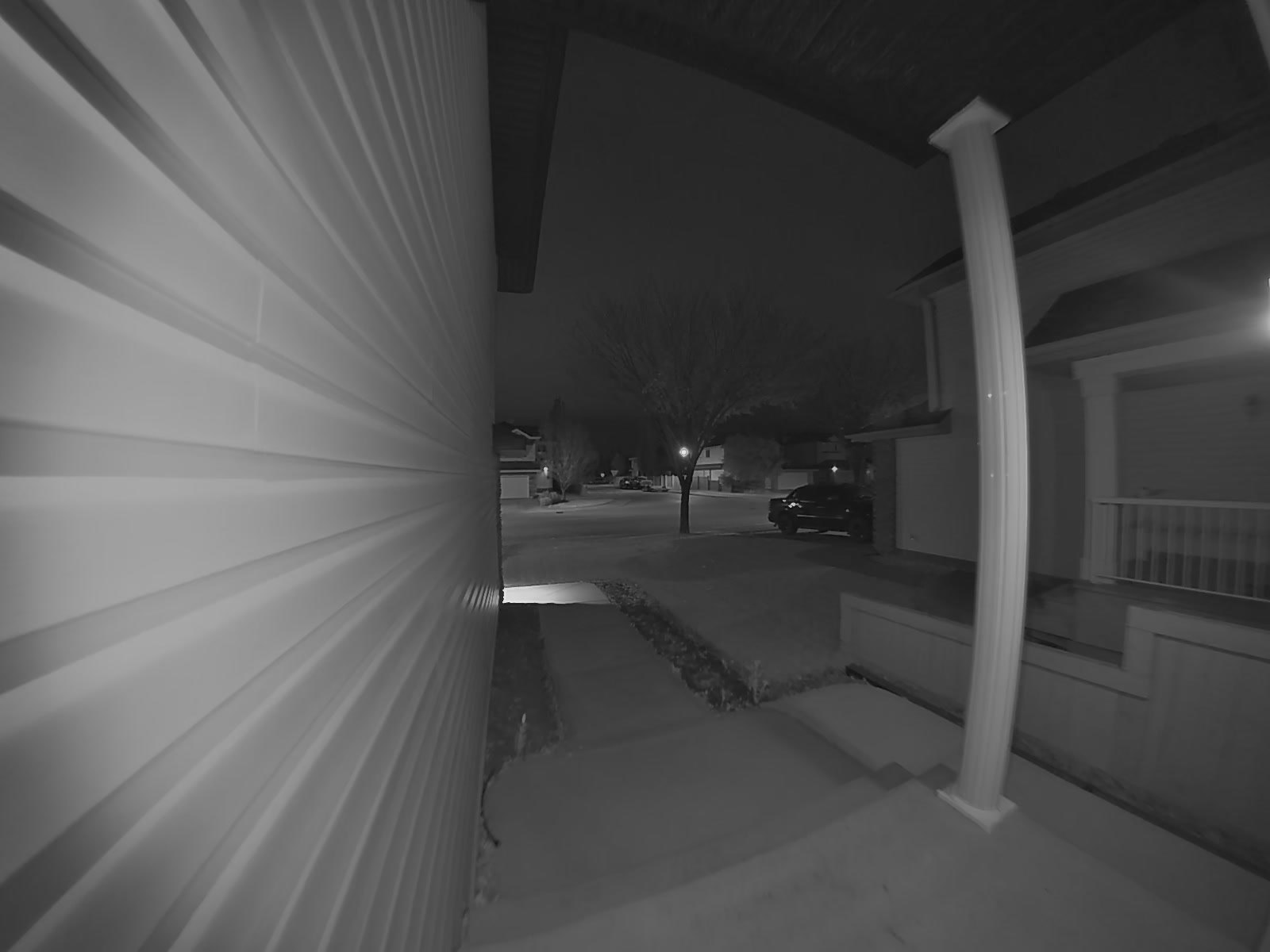
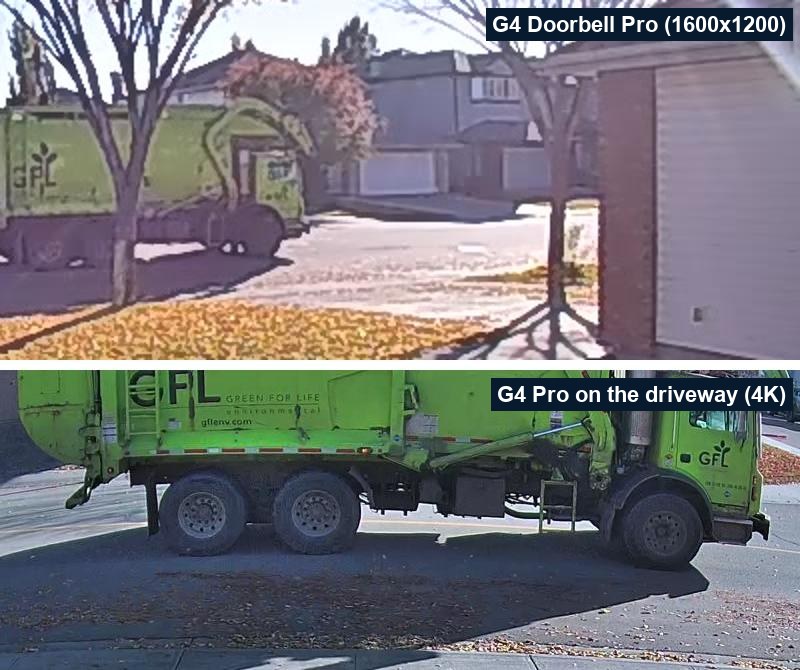
What the G4 Doorbell Pro actually looks like (tested by us)
This is the one doorbell on this list we run ourselves, so here are real frames from ours, straight from the recorder with no editing. It faces a street with the sun crossing right in front of it in the morning, which is about the worst light a doorbell camera can get.
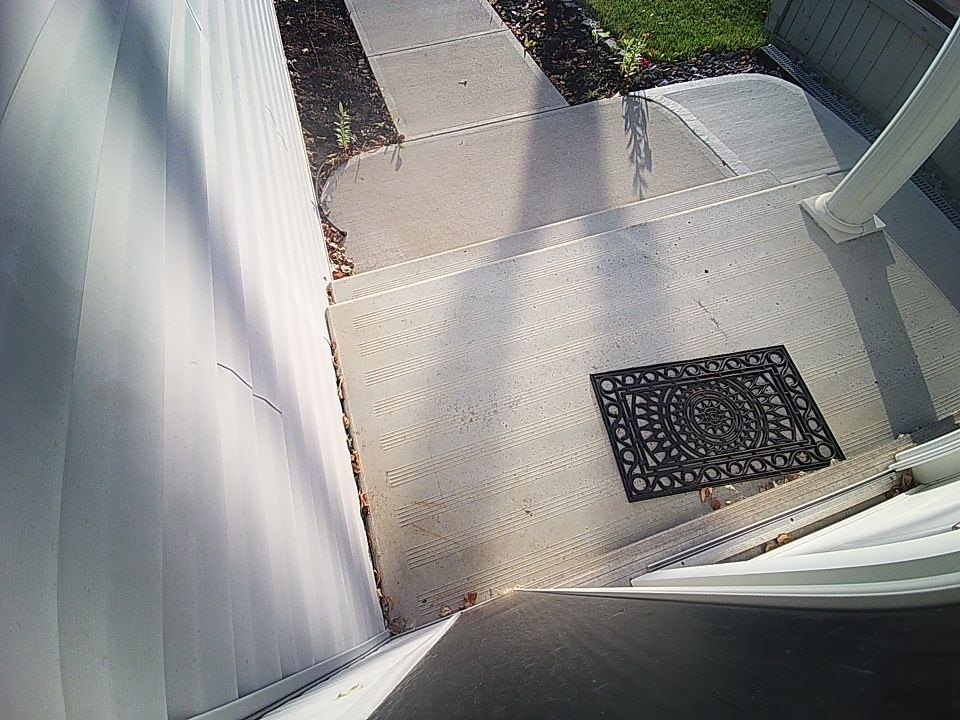
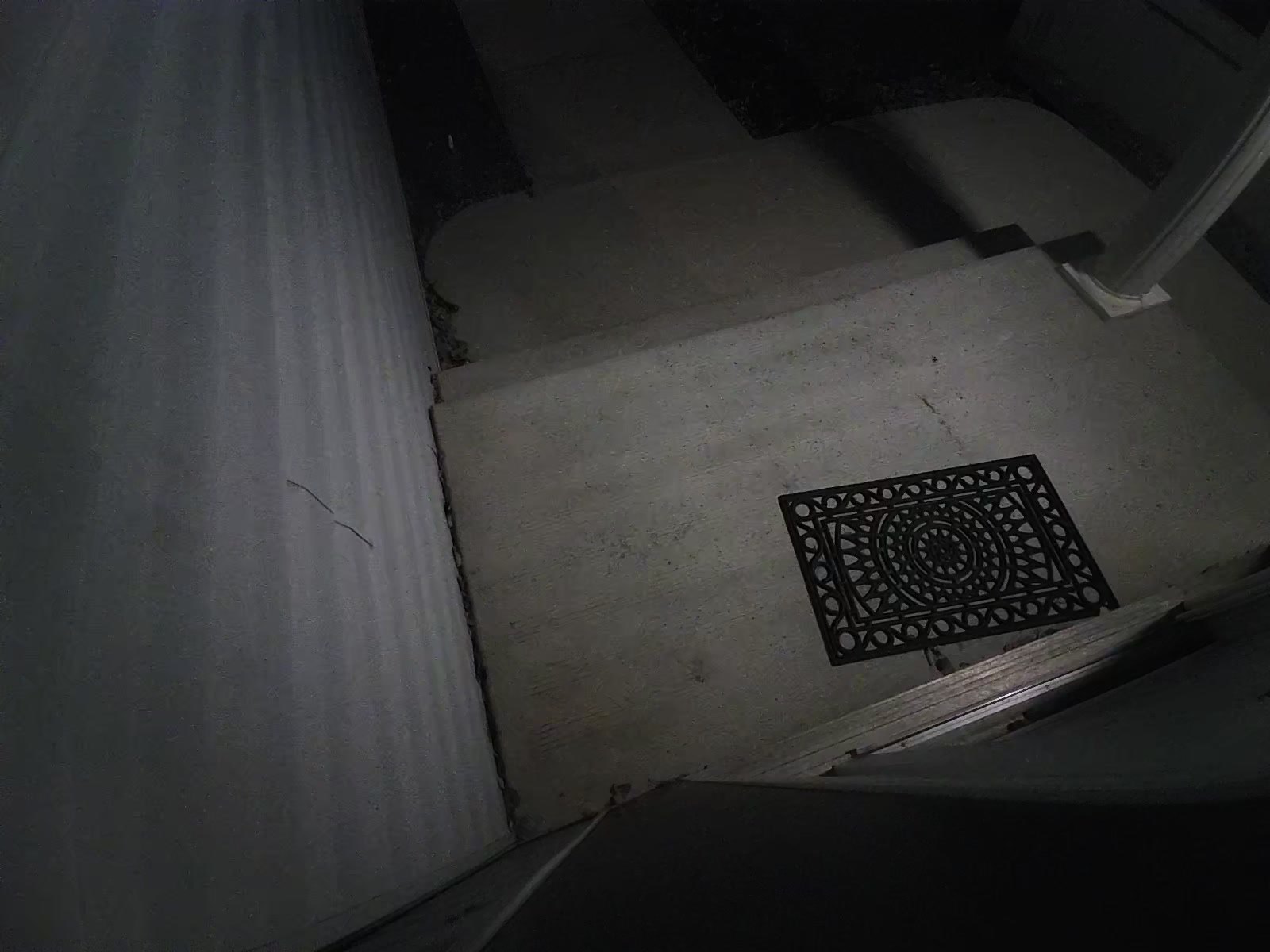
A tip from the Home Assistant forum: in your automations, trigger on the UniFi Protect event entity filtered to “ring”, not the old binary sensor. One owner had delayed chimes, missed rings and false rings at 2 a.m. after Protect updates, and switching to the event entity fixed all three. Home Assistant’s docs recommend the same. Also, the integration needs a local Protect user, not a Ubiquiti cloud account.
Search Amazon.ca for the UniFi G4 Doorbell Pro
For Apple Home
Aqara Doorbell Camera G400 (Wired)
For an Apple household, this is the one both reviewers we watched came away liking. It supports HomeKit Secure Video, so your HomePods act as chimes and Apple Photos recognises familiar faces, and it also works with Alexa, Google and SmartThings. Mark’s Tech Vlogs, who says he does not do sponsored videos, reported that “it hasn’t gone offline once” in about a month, and that “if you use Apple Home, I honestly don’t think you need the subscription.” George Langabeer, who installs smart home and security gear for a living and was sent the unit free by Aqara, called it “by far my favorite Apple HomeKit Secure Video doorbell.”
- Power: PoE or existing 8 to 24 V AC/DC doorbell wiring. No battery.
- Chime: Aqara says it does not work with your existing chime. A plug-in chime is included.
- Video and storage: 2K, 165 degrees, a tall 3:4 frame. 24/7 recording to microSD up to 512 GB, with automatic backup to a NAS. Through Apple Home the resolution is capped at 1200p. Night vision is black and white.
- Home Assistant: no built-in Aqara doorbell integration. You can pull the video in over RTSP or ONVIF, but we could not confirm that the button press comes through that way. No Matter support for the camera.
- Price: US $99.99. George notes the Aqara cloud trial is 90 days and you cannot opt out of it, though you do not need it.
One installer detail from Mark’s review: the infrared bounced off a wall right beside his doorbell and washed out the night picture. A strip of black tape on the wall fixed it. That happens with most doorbells mounted tight to a side wall.
Search Amazon.ca for the Aqara G400
Aqara Doorbell Camera Hub G410
The G410 is the answer if you want HomeKit Secure Video and have no wires at the door. It runs on six AA batteries, which Aqara rates at up to five months, or on existing doorbell wiring with the batteries as backup. The indoor chime does more than ring. It is also the Wi-Fi repeater for the doorbell, the microSD slot, a Zigbee hub and a Thread border router. As WhatGear put it, “The chime element isn’t just a chime, it’s actually a signal repeater.” That means it has to stay plugged in near the door. It has a 175-degree view, mmWave radar for motion, and face recognition that runs locally with no subscription. US $144.99.
Skip it if Home Assistant is your main system. An owner on the Home Assistant forum added it over Matter and got a single “identify” button, with no doorbell press at all. The RTSP stream is video only and, per Aqara’s note quoted in that thread, only available when the doorbell is wired.
Search Amazon.ca for the Aqara G410
Coming in December: the LG Video Doorbell for Apple Home
Apple announced its Apple Home Collection on October 13. The doorbell in it is made by LG: the LG Video Doorbell Wired, from US $249.95, sold in the US, Canada and the UK starting in December. It has two cameras, one for visitors and one for parcels, plus a spotlight, and it rings through HomePods and Apple’s new HomeView hub. Video history is stored in your iCloud+ plan with no separate camera subscription. Engadget reports it does not support Matter, quoting Apple. Nobody has reviewed it yet, and there is no known way to get it into Home Assistant, so treat it as one to watch rather than one to buy.
The big names
Ring Battery Doorbell. The easiest setup of the lot, per both Linus Tech Tips and Speak to the Geek, though Linus also found the app full of ads with a store built in. It works with your existing mechanical or digital chime, and on 8 to 24 V AC wiring the battery trickle-charges. The catch is the subscription. Ring has no local storage, so recording, history and most of the smart features need a Ring Protect plan. Home Assistant’s Ring integration works, but it goes through Ring’s cloud, and the last recording needs a Protect plan. Rated to -21 C (-5 F). US $99.99.
Google Nest Doorbell (wired, 3rd gen). Wired only, 16 to 24 V AC, and it works with your existing chime using the included chime connector. The square 2K picture is good. Without a plan you get up to six hours of event previews, with clips up to 10 seconds. Home Assistant’s Nest integration works through Google’s cloud and needs a one-time US $5 Device Access fee and a Google Cloud project, and the 3rd gen is not yet on its supported list. Rated to -20 C (-4 F). US $199.99.
Search Amazon.ca for the Nest Doorbell (wired)
eufy Video Doorbell E340. Two cameras, one looking down at parcels, with 8 GB of storage on the doorbell itself and no subscription. It runs on battery or 8 to 24 V wiring, works with your existing mechanical chime, and is rated to -20 C (-4 F). It is Wi-Fi 2.4 GHz only and has no HomeKit, and we found no built-in Home Assistant integration for eufy Security. Linus Tech Tips rated eufy well on features but held it back over the company’s past security problems, which is worth knowing before you put one on your front door. US $169.99.
Our short list
- Home Assistant, and you can get a network cable to the door: the Reolink Video Doorbell PoE. If you already run UniFi Protect, a UniFi doorbell instead.
- Home Assistant, battery or doorbell wires only: the Reolink Battery Doorbell (2nd Gen), with the Home Hub in the budget, and wired if you can.
- Apple Home, wired: the Aqara G400. If you would rather wait, the LG doorbell arrives in December.
- Apple Home, no wires: the Aqara G410.
- You want the simplest app and do not mind a monthly plan: the Nest Doorbell.
- Somewhere with a real winter: wire it, and check the temperature rating before you buy.
Sources
- Linus Tech Tips: I Tried All The Best (and Worst) Doorbells
- Byte of Geek: Reolink Gen 2 Doorbell and Home Assistant
- Simon Says Home Assistant: Reolink Battery Video Doorbell (2nd Gen) (unit sent free by Reolink)
- Speak to the Geek: Reolink’s New Video Doorbell vs Ring (unit sent by Reolink, comparison requested by Reolink)
- Everything Smart Home: Reolink Video Doorbell review (2023)
- Frenck: Reolink doorbell for my Home Assistant smart home
- Mark’s Tech Vlogs: Aqara G400
- George Langabeer: Aqara G400 review (unit sent free by Aqara)
- WhatGear: Aqara G410 Video Doorbell
- Reolink Video Doorbell PoE specifications
- Reolink Battery Video Doorbell (2nd Gen) specifications
- Aqara Doorbell Camera G400
- Aqara Video Doorbell G410
- UniFi G4 Doorbell Pro tech specs
- UniFi G6 Entry tech specs
- Ring Battery Doorbell
- Google Nest Doorbell (wired, 3rd gen) specifications
- eufy Video Doorbell E340
- Home Assistant docs: Reolink
- Home Assistant docs: UniFi Protect
- Home Assistant docs: Ring
- Home Assistant docs: Google Nest
- Home Assistant community: Reolink battery drain while hardwired
- Home Assistant community: Reolink doorbell with a mechanical chime
- Home Assistant community: Aqara G410 doorbell
- Home Assistant community: UniFi doorbell speed and reliability
- Apple Newsroom: Introducing Apple Home Collection
- Engadget: Apple debuts the Apple Home Collection