
Home Assistant’s schedule helper tells you one thing on a dashboard: on or off. It does not show when it will next change. A community member has released a custom Lovelace card, Schedule Timeline Card, to fill that gap. Early users also hit a download error in HACS, which is worth knowing about before you try it.
What the card does
According to the project page, it has three display modes:
- Simple: an on/off indicator with an icon you choose.
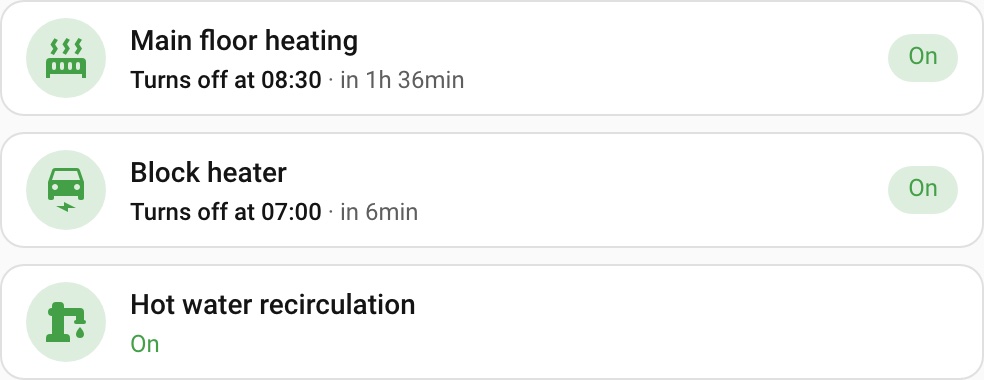
- Next event: the next activation or deactivation with a countdown, for example “Turns off at 20:00, in 1h 00min”.
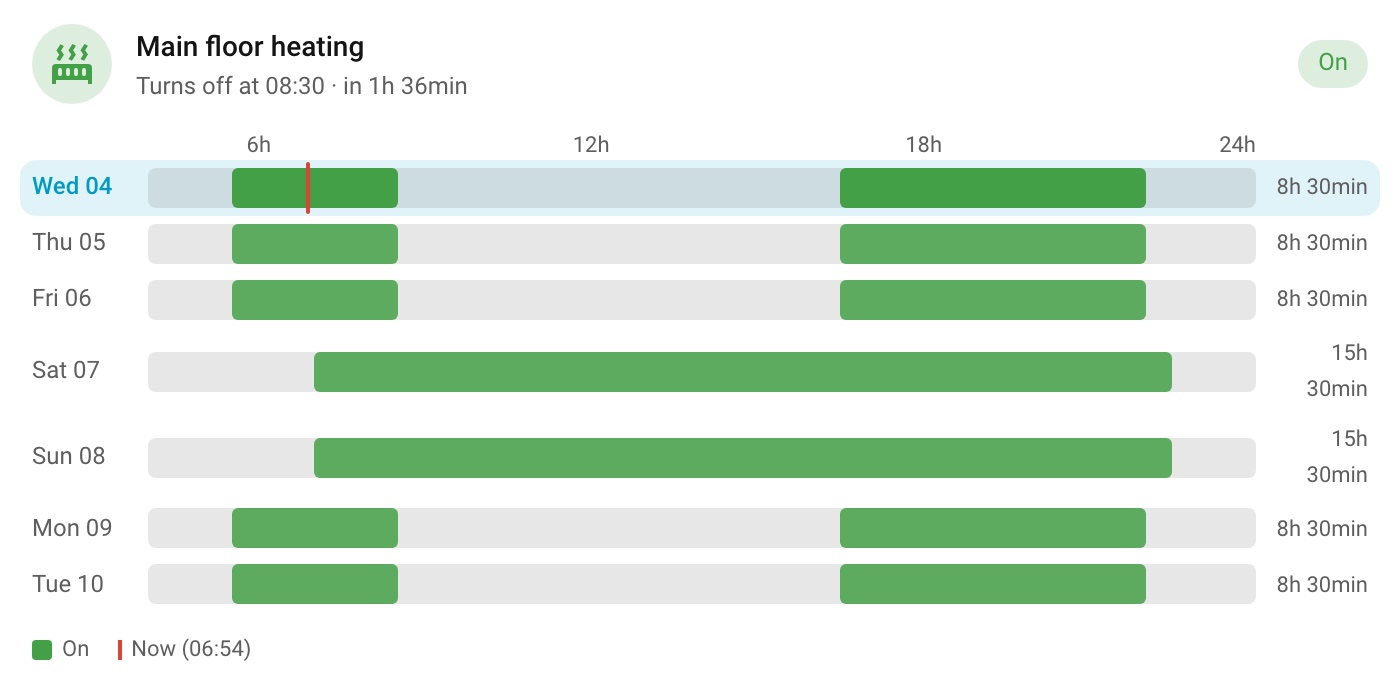
- Calendar: a 24 hour timeline per day, showing 1 to 7 days, with today first and a marker for the current time.
It also supports separate icons for on and off, a limited hour window such as 06:00 to 22:00, an optional total of on-hours per day, tooltips with start, end and duration, and a visual editor so no YAML is needed. It follows your theme colours and shows English or Portuguese text depending on your Home Assistant language. The listed example is an irrigation schedule, and a pool pump is another obvious fit.
Limits to know about
- The card reads the configured periods through the schedule/list WebSocket command. Schedules defined in YAML may not be returned. Simple and next modes keep working in that case, and calendar mode shows a notice. Schedules created in the UI as helpers are fully supported.
- Home Assistant schedule periods end at 24:00 at most, so a period that crosses midnight appears as two blocks, one at the end of a day and one at the start of the next.
- The list refreshes when the entity changes and every 5 minutes.
- The repository showed one star and no forks when we looked, so this is a very new project.
The HACS download problem
The author’s forum thread says the card is installed through HACS as a custom repository with the category Dashboard, and that a request to join the HACS default list is awaiting review. Within about an hour of the announcement, people in the thread reported HACS failing to download the v1.0.4 file with a 400 error: “Got more than 8190 bytes when reading”, pointing at a very long header. One person said they saw it on every update attempt that afternoon. Another said a later update worked, so it looks intermittent.
One poster suggested GitHub had lengthened its Content Security Policy header past the default 8 KB limit in Home Assistant’s HTTP client library. That is a user’s theory in the thread. We have not seen it confirmed by GitHub, HACS or Home Assistant, so treat the cause as unconfirmed. The error appears to come from the download path rather than from the card’s code.
What to do
- If the HACS install fails with that 400 error, retry later rather than changing your setup. It may clear on its own.
- The manual route is documented: download schedule-timeline-card.js from the latest release, copy it to /config/www/, then under Settings > Dashboards > Resources add /local/schedule-timeline-card.js as a JavaScript module and hard refresh the browser.
- After an update, if you still see the old version, clear the browser cache or add a version suffix to the resource URL, such as ?v=2.
- If your schedules are defined in YAML, expect calendar mode to be unavailable. Recreating them as UI helpers is the supported path, but check your automations first.
- It is a single-maintainer custom card. Install it on a dashboard you can afford to break, and keep a backup before adding resources.
This is a small, useful idea for anyone running irrigation, pool pumps or heating on schedule helpers. We would wait for the download issue to settle, and for the HACS default listing, before relying on it. The author asks for bug reports through GitHub Issues, with your Home Assistant version and card configuration included.